 Marblo
AI teamsCoding agents, one team
Assign work, verify results, and review before moving to the next task.
AI usage is billed separately · Marblo auto-connects supported AI CLI accounts already signed in.
Chat mode
Coming in the next updateHand off work in a sentence
New installs start in Chat mode. Describe what you want in the chat, Marblo splits it up and hands it out, and marble characters show the progress.
1. Ask in the Chat tab
Type the job under "What should we take on?" or pick one of the examples.
2. Follow along in Overview
Each job gets a marble character that shows Waiting, Working, Checking or Done, and says Needs help when it is stuck.
3. Open it in Results
Finished work opens in the Results tab. Switch to Marblo mode any time to work with the board and worktrees directly.
You don't have to be a developer
In a non-dev project, pick Documents, Marketing or Research and the examples and checks change to fit that work.
Documents
Example first request
Three things checked when it's done
- Does it fit the stated purpose and reader?
- Are any chapters, sections or requirements missing?
- Are spelling and length right, and are spots needing fact-checks marked?
Marketing
Example first request
Three things checked when it's done
- Does it match the brand voice and the channel?
- Any banned words, overclaims or unverified numbers?
- Does it fit each channel's character limit?
Research
Example first request
Three things checked when it's done
- Does every source link actually open?
- Do the quotes match what the sources say?
- Are any sub-questions unanswered or counter-evidence missing?
Proof, not just a promise
From assignment to review
Follow assignment, isolated work, tests, and reviews in one place.
Tickets are the control surface
The board shows ownership and state; it is not the whole differentiator.
Agents work in parallel
Claude Code, Codex, and other agents can move separate tickets in the same project.
Model-specific lanes
Spawn the right coding agent for backend, frontend, tests, or review work.
Results converge through review
Worktree isolation and review state keep parallel output from becoming uncontrolled merges.
Start your first agent team
Follow the guide for setup, account connection, and your first assignment.
The developer question
Many terminals, one place to coordinate
Bring parallel work together through task ownership and review.
Merge conflicts become invisible until late.
Each agent works in an isolated worktree, then converges through review instead of racing inside one checkout.
Merged does not always mean done.
Task state stays explicit: claimed, in progress, review, done. A merge is one gate, not the whole definition of completion.
Nobody knows who changed what.
Ownership lives on the ticket, with activity logs tied to the agent doing the work.
There is no clean isolation.
Parallel agents get separate workspace context, so one experiment does not trample another.
The plan goes stale mid-run.
The orchestrator can reassign, ask for clarification, and route follow-up work back onto the board.
See the team at work
Watch tasks move from assignment to review.
3-month free beta
Get 5 months of Pro in total after survey review, or 9 months if selected for and completing an interview.
Meet us in the community first.
AI Builders open chat (KakaoTalk)💎 What Founders get
- ✓ Free beta — full Marblo feature access before public launch
- ✓ 5 months of Marblo Pro free in total when you submit the thoughtful survey and pass operator review (9 months total if a top respondent completes an interview)
- ✓ Founder Discord community — a private channel for Founders only
- ✓ 50% off the course (optional)
🤝 What Founders do
- 📝 Thoughtful survey (7 questions) after the 3-month beta — required
- 🎤 Video interview — for top respondents, extends Pro from 5 months to 9 months total
AI usage is billed separately by the provider you connect.
Learn more →Coordinate work through completion
See who owns each task, its progress, and its review status.
A closed loop to the next task
Completion and stalled-work signals return to the orchestrator for the next decision.
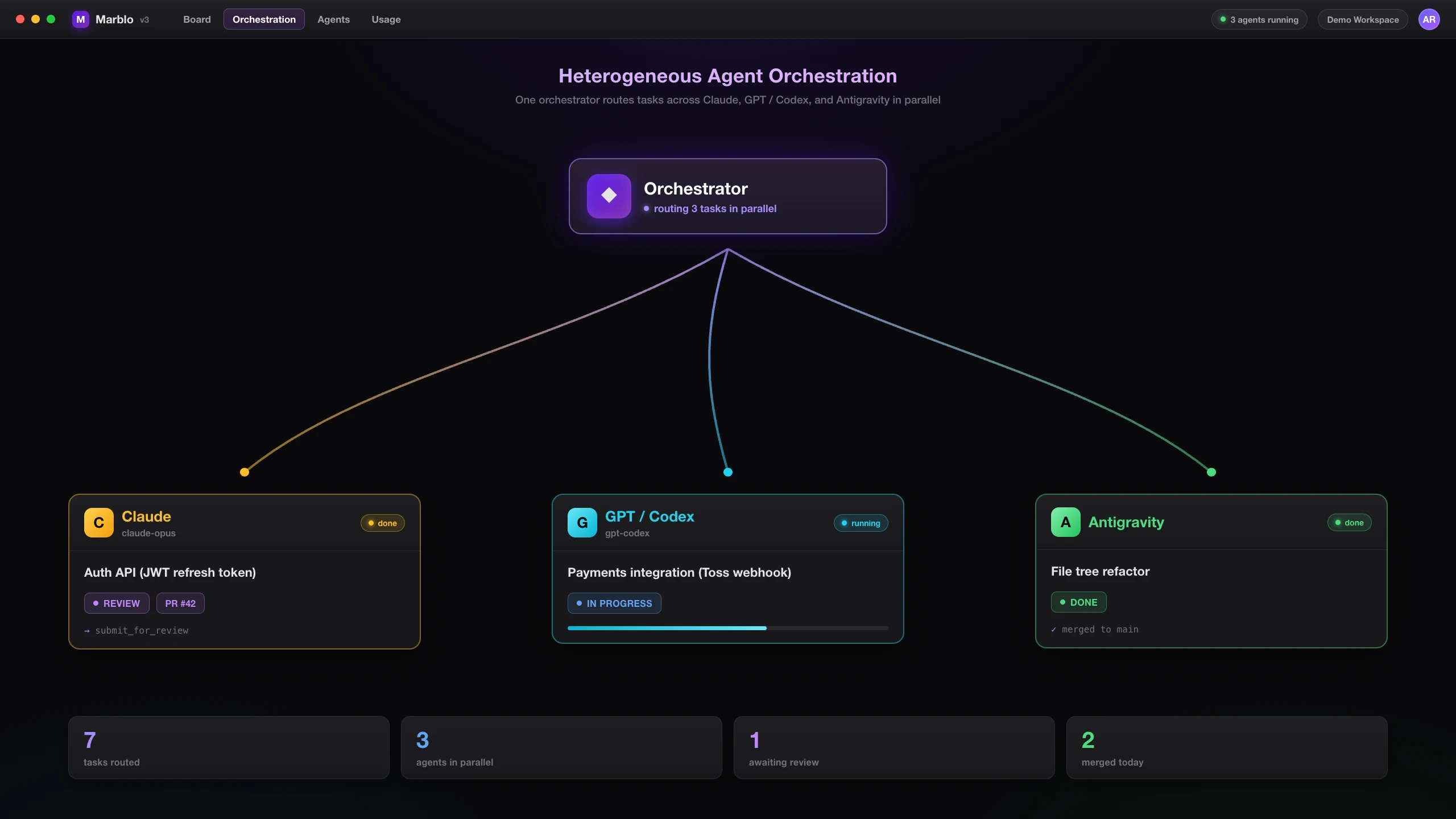
Example coordination workflow
Concurrent Agent Lanes
Central Orchestrator
Review and Merge Gate
Every picture below is an illustration to help explain the feature.
See ownership and progress
Check each task's owner, progress, and review status.
- Track assignment, progress, and review
- Real-time work logs per agent
- Drag and drop to adjust priorities
Review changes in the task
Review changed files and diffs without leaving the task.
- Attach an agent directly to a ticket
- Review changed files as an inline diff
- Follow ticket → work → result in one place
Agent mosaic
View the terminals of active agents together on one screen.
- See multiple terminals in a mosaic
- Read output from active agents
- Open the agent terminal you need
Orchestrator brain
See mission order, progress, and what needs your attention.
- See the mission's task order
- Follow active steps and results
- Review items that need your attention
See the mission's task order
Follow active steps and results
Review items that need your attention
Web tabs alongside your work
Let agents read web pages you allow and keep the work in context.
- Open web pages alongside your work
- Share only pages you allow
- Connect page context to the task
What an agent team needs
Compare parallel work, isolation, and review workflows.
| Feature | Marblo | Claude Code | Codex CLI | Orca |
|---|---|---|---|---|
| Several agents working at once | ||||
| Per-agent isolated worktrees | ||||
| Task → agent ownership and activity trail | ||||
| Review and safe-merge evidence | ||||
| Model-aware agent spawning | ||||
| Board/task surface | ||||
| Price | $19/mo | BYO | BYO | OSS |
From early use
Separate the maker's experience from verified beta feedback.
“I spawned close to a hundred agents at once and ran them together — it was genuinely something to see.”
“With the orchestrator at the center and the other agents working through it, managing a fleet of agents felt far easier.”
Course in progress
A course on running agent teams through practical projects is in progress.
Marblo v3: AI Agent Army Workspace
From multi-agent setup to production deployment — learn AI agent orchestration through real-world projects
Start an agent team
Read practical notes on setup, parallel work, and review.
Six Agents Charging at Once — Without Stepping on Each Other
Anyone who's run agents in parallel knows the real problem isn't speed — it's collision. Here's why giving each agent its own worktree is the game-changer, told as a story.
Claude Code Subagents in Practice — Working in Parallel
When and how to use Claude Code subagents, from a practical angle: splitting exploration, implementation, and review across parallel agents.
Multi-Agent Orchestration — A Practical Structure, Seen Through Marblo
Running an army of agents, not just one. How Marblo coordinates heterogeneous AI agents simultaneously on a kanban board.
Commanding an AI Agent Army with Tickets and Kanban
As agents multiply, 'who did what, how far' gets blurry. How to command and track an army with tickets and a kanban board.
Beta feedback
“Seeing several agents move separate tickets made parallel work easier to trust”
“Managing agent progress on the kanban board is incredibly intuitive”
“The useful part is not the board alone — it is the orchestration around it”
Frequently asked questions
The five things people check most before installing.
- What is Marblo?
Marblo is a desktop app that turns coding agents such as Claude Code and Codex into an engineering team. A central orchestrator ties task ownership, isolated worktrees, progress state, and review/merge gates into one workflow. It runs on macOS and Windows.
Read what Marblo is →- Which AI agents does Marblo support?
Marblo runs heterogeneous AI agents — Claude, GPT/Codex, and Antigravity — at the same time. It assigns roles such as backend, frontend, and testing based on each model's strengths, and supports the Model Context Protocol (MCP) natively.
Open the getting-started guide →- How much does Marblo cost?
Marblo's Free plan is $0/month and the Pro plan is $19/month. AI usage is billed separately — each agent runs on your own existing AI accounts (Claude Code, Codex, etc.) that you connect, or an API key.
Compare plans →- Does Marblo work on both Mac and Windows?
Yes. Marblo ships as a desktop app for macOS (Apple Silicon) and Windows, and you can get the installer from the download page. The app runs locally; AI requests go to your chosen provider, and board data goes to Firebase.
Get the installer →- Do I need my own AI accounts (Claude Code, Codex, etc.) to use Marblo?
Yes. Because Marblo is a heterogeneous AI-agent orchestrator, each model (Claude, GPT/Codex, and others) runs on your own existing AI account (Claude Code / Codex CLI sign-in, or an API key). Supported AI CLI accounts already signed in are connected automatically. Follow the app guidance if CLI installation, sign-in, or connection recovery is needed. The Marblo subscription is the cost of orchestrating those agents and does not include AI usage fees.
See all FAQs →
Start your agent team
Try assignment and review with the 3-month free beta.